Templates
Nette uses the Latte templating system. Latte is used because it is the most secure templating system for PHP, and at the same time, the most intuitive system. You don't need to learn much new; knowledge of PHP and a few tags will suffice.
It's common for a page to be composed of a layout template + the template for the specific action. This is what a layout
template might look like; notice the {block} blocks and the {include} tag:
<!DOCTYPE html>
<html>
<head>
	<title>{block title}My App{/block}</title>
</head>
<body>
	<header>...</header>
	{include content}
	<footer>...</footer>
</body>
</html>
And this would be the action template:
{block title}Homepage{/block}

{block content}
<h1>Homepage</h1>
...
{/block}
It defines the content block, which is inserted in place of {include content} in the layout, and also
re-defines the title block, which overwrites {block title} in the layout. Try to imagine the result.
Template Lookup
In presenters, you don't need to specify which template should be rendered; the framework automatically deduces the path, saving you from writing it.
If you use a directory structure where each presenter has its own directory, simply place the template in this directory under
the name of the action (i.e., view). For example, for the default action, use the default.latte
template:
app/
└── Presentation/
    └── Home/
        ├── HomePresenter.php
        └── default.latte
If you use a structure where presenters are together in one directory and templates are in a templates folder,
save it either in the file <Presenter>.<view>.latte or
<Presenter>/<view>.latte:
app/
└── Presenters/
    ├── HomePresenter.php
    └── templates/
        ├── Home/
        │   └── default.latte   ← 1st variant
        └── Home.default.latte  ← 2nd variant
The templates directory can also be placed one level higher, i.e., at the same level as the directory with
presenter classes.
If the template is not found, the presenter responds with a 404 – page not found error.
You can change the view using $this->setView('otherView'). It is also possible to directly specify the template
file using $this->template->setFile('/path/to/template.latte').
The files where templates are looked up can be changed by overriding the formatTemplateFiles() method, which returns an array of possible file names.
Layout Template Lookup
Nette also automatically searches for the layout file.
If you use a directory structure where each presenter has its own directory, place the layout either in the folder with the presenter, if it is specific only to it, or one level higher, if it is common to multiple presenters:
app/
└── Presentation/
    ├── @layout.latte           ← common layout
    └── Home/
        ├── @layout.latte       ← only for Home presenter
        ├── HomePresenter.php
        └── default.latte
If you use a structure where presenters are grouped together in one directory and templates are in a templates
folder, the layout will be expected in these locations:
app/
└── Presenters/
    ├── HomePresenter.php
    └── templates/
        ├── @layout.latte       ← common layout
        ├── Home/
        │   └── @layout.latte   ← only for Home, 1st variant
        └── Home.@layout.latte  ← only for Home, 2nd variant
If the presenter is located in a module, it will also search further up the directory levels, according to the module nesting.
The layout name can be changed using $this->setLayout('layoutAdmin'), and then it will be expected in the file
@layoutAdmin.latte. You can also directly specify the layout template file using
$this->setLayout('/path/to/template.latte').
Using $this->setLayout(false) or the {layout none} tag inside the template disables layout
lookup.
The files where layout templates are looked up can be changed by overriding the formatLayoutTemplateFiles() method, which returns an array of possible file names.
Template Variables
Variables are passed to templates by writing them to $this->template. They then become available in the
template as local variables:
$this->template->article = $this->articles->getById($id);
To automatically pass a property value to the template as a variable, mark it with the
#[TemplateVariable] attribute and public visibility:
use Nette\Application\Attributes\TemplateVariable;

class ArticlePresenter extends Nette\Application\UI\Presenter
{
	#[TemplateVariable]
	public string $siteName = 'My blog';
}
If you pass a variable with the same name to the template, #[TemplateVariable] won't override it.
Default Variables
Presenters and components automatically pass several useful variables to templates:
$basePathis the absolute URL path to the root directory (e.g.,/eshop)$baseUrlis the absolute URL to the root directory (e.g.,http://localhost/eshop)$useris an object representing the user$presenteris the current presenter$controlis the current component or presenter$flashesis an array of messages sent by theflashMessage()function
If you use a custom template class, these variables are passed if you create a property for them.
Type-Safe Templates
When developing robust applications, it's useful to explicitly define which variables the template expects and their types. This provides type checking in PHP, smart hints in your IDE, and enables static analysis to catch errors.
How do you define such a list? Simply as a class with properties representing template variables. Name it similarly to the
presenter, just with Template at the end:
/**
 * @property-read ArticleTemplate $template
 */
class ArticlePresenter extends Nette\Application\UI\Presenter
{
}

class ArticleTemplate extends Nette\Bridges\ApplicationLatte\Template
{
	public Model\Article $article;
	public Nette\Security\User $user;

	// and other variables
}
The $this->template object in the presenter will now be an instance of the ArticleTemplate class.
PHP will thus check the declared types when writing.
Nette chooses the template class automatically. First it looks for a class named
<Presenter><Action>Template, e.g. ArticleEditTemplate for the edit action, and
only if it doesn't exist does it fall back to <Presenter>Template.
The @property-read annotation is for the IDE and static analysis, enabling code completion, see PhpStorm and code completion for
$this->template.
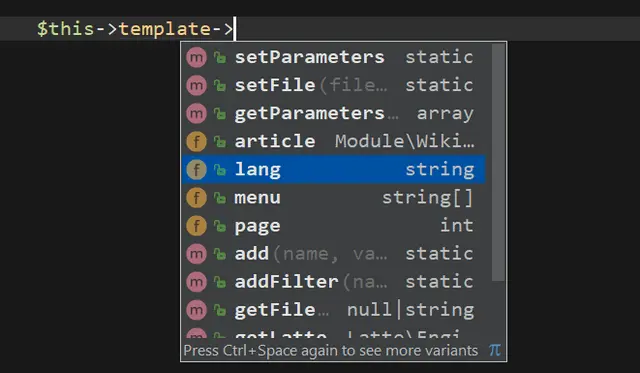
You can also use code completion directly in templates. Just install the Latte plugin for PhpStorm and specify the template parameter class name at the beginning of the template, more in the chapter Latte: type system:
{templateType App\Presentation\Article\ArticleTemplate}
...
The same applies to components. Just follow the naming convention and create a parameter class FifteenTemplate for
a component like FifteenControl.
If you need to use a different parameter class, use the createTemplate() method:
public function renderDefault(): void
{
	$template = $this->createTemplate(SpecialTemplate::class);
	$template->foo = 123;
	// ...
	$this->sendTemplate($template);
}
If you need to influence how the template is finalized before rendering – for example to add variables
shared across all actions – you can override the completeTemplate() method in the presenter. It is called just
before the template is rendered:
protected function completeTemplate(Nette\Application\UI\Template $template): void
{
	parent::completeTemplate($template);
	$template->siteName = 'My blog';
}
Creating Links
In the template, links to other presenters & actions are created this way:
<a n:href="Product:show">product detail</a>
The n:href attribute is very handy for HTML <a> tags. If we want to print the link elsewhere,
for example in text, we use {link}:
URL is: {link Home:default}
More information can be found in the chapter Creating URL Links.
Custom Filters, Tags, etc.
The Latte templating system can be extended with custom filters, functions, tags, and other elements. There are three approaches available, ranging from quick ad-hoc solutions to architectural patterns for entire applications.
Ad-hoc in Presenter Methods
The quickest approach is adding filters or functions directly in presenter or component code. In presenters, the
beforeRender() or render<View>() methods work well for this:
protected function beforeRender(): void
{
	// adding a filter
	$this->template->addFilter('money', fn($val) => '$' . number_format($val, 2));

	// adding a function
	$this->template->addFunction('isWeekend', fn($date) => $date->format('N') >= 6);
}
In the template:
<p>Price: {$price|money}</p>

{if isWeekend($now)} ... {/if}
For more complex logic, you can configure the Latte\Engine object directly:
protected function beforeRender(): void
{
	$latte = $this->template->getLatte();
	$latte->setFeature(Latte\Feature::MigrationWarnings);
}
Using Attributes
A more elegant approach is defining filters and functions as methods directly in the presenter or component's template parameter class, marked with attributes:
class ArticleTemplate extends Nette\Bridges\ApplicationLatte\Template
{
	#[Latte\Attributes\TemplateFilter]
	public function money(float $val): string
	{
		return '$' . number_format($val, 2);
	}

	#[Latte\Attributes\TemplateFunction]
	public function isWeekend(DateTimeInterface $date): bool
	{
		return $date->format('N') >= 6;
	}
}
Latte automatically discovers and registers methods marked with these attributes. The filter or function name in templates matches the method name. These methods must be public.
Globally Using Extensions
The previous approaches suit filters and functions needed only in specific presenters or components, not application-wide. For the entire application, creating an extension works best. This class centralizes all Latte extensions for your project. A brief example:
namespace App\Presentation\Accessory;

final class LatteExtension extends Latte\Extension
{
	public function __construct(
		private App\Model\Facade $facade,
		private Nette\Security\User $user,
		// ...
	) {
	}

	public function getFilters(): array
	{
		return [
			'timeAgoInWords' => $this->filterTimeAgoInWords(...),
			'money' => $this->filterMoney(...),
			// ...
		];
	}

	public function getFunctions(): array
	{
		return [
			'canEditArticle' =>
				fn($article) => $this->facade->canEditArticle($article, $this->user->getId()),
			// ...
		];
	}

	private function filterTimeAgoInWords(DateTimeInterface $time): string
	{
		// ...
	}

	// ...
}
Register the extension through configuration:
latte:
	extensions:
		- App\Presentation\Accessory\LatteExtension
Extensions offer several advantages: dependency injection support, access to your application's model layer, and centralized management of all extensions. They also support custom tags, providers, compiler passes, and more.
Setting Up All Templates
The TemplateFactory service, which creates all templates, offers a public $onCreate array of
callbacks. These are called every time any template is created, so you can set up filters, functions, or variables for all
templates in the application from a single place. Each callback receives the newly created template. Have the
TemplateFactory service injected and
register the callbacks, e.g. during application startup:
$templateFactory->onCreate[] = function (Nette\Bridges\ApplicationLatte\Template $template): void {
	$template->addFilter('money', fn($val) => '$' . number_format($val, 2));
};
Translating
If you are programming a multilingual application, you will likely need to output some texts in the template in different
languages. Nette Framework defines a translation interface Nette\Localization\Translator for this purpose,
which has a single method translate(). It accepts the message $message, which is usually a string, and
any other parameters. The task is to return the translated string. Nette does not have a default implementation; you can choose
from several ready-made solutions available on Componette according to
your needs. Their documentation explains how to configure the translator.
Templates can be set up with a translator, which we get passed, using the setTranslator()
method:
protected function beforeRender(): void
{
	// ...
	$this->template->setTranslator($translator);
}
Alternatively, the translator can be set using configuration:
latte:
	extensions:
		- Latte\Essential\TranslatorExtension(@Nette\Localization\Translator)
Then, the translator can be used, for example, as a filter |translate, including additional parameters that are
passed to the translate() method (see foo, bar):
<a href="basket">{='Basket'|translate}</a>
<span>{$item|translate}</span>
<span>{$item|translate, foo, bar}</span>
Or as an underscore tag:
<a href="basket">{_'Basket'}</a>
<span>{_$item}</span>
<span>{_$item, foo, bar}</span>
For translating a section of the template, there is a paired tag {translate} (since Latte 2.11, previously the tag
{_} was used):
<a href="order">{translate}Order{/translate}</a>
<a href="order">{translate foo, bar}Order{/translate}</a>
The translator is normally called at runtime when rendering the template. Latte version 3, however, can translate all static texts already during template compilation. This saves performance, as each string is translated only once, and the resulting translation is written into the compiled form. This creates multiple compiled versions of the template in the cache directory, one for each language. To do this, simply specify the language as the second parameter:
protected function beforeRender(): void
{
	// ...
	$this->template->setTranslator($translator, $lang);
}
Static text means, for example, {_'hello'} or {translate}hello{/translate}. Non-static texts, like
{_$foo}, will continue to be translated at runtime.
