Routing
The router handles everything related to URL addresses, so you don't have to think about them. We will show you:
- how to configure the router to make URLs look as you wish
- discuss SEO and redirection
- and demonstrate how to write a custom router
More human-friendly URLs (also known as cool or pretty URLs) are more usable, memorable, and contribute positively to SEO. Nette keeps this in mind and fully caters to developers' needs. You can design the exact URL structure you want for your application. You can even design it when the application is already finished, as it requires no changes to code or templates. It's defined elegantly in a single place, the router, rather than being scattered as annotations throughout all presenters.
The router in Nette is exceptional because it is bidirectional. It can both decode URLs from HTTP requests and create links. Thus, it plays a crucial role in Nette Application, as it not only decides which presenter and action will execute the current request but is also used for generating URLs in templates, etc.
However, the router isn't limited to just this usage; you can use it in applications where presenters aren't used at all, for REST APIs, etc. More details are in the section on Standalone Usage.
Route Collection
The most pleasant way to define the structure of URL addresses in an application is offered by the Nette\Application\Routers\RouteList class. The definition consists of a list of so-called routes, i.e., masks of URL addresses and their associated presenters and actions using a simple API. We don't need to name the routes in any way.
$router = new Nette\Application\Routers\RouteList;
$router->addRoute('rss.xml', 'Feed:rss');
$router->addRoute('article/<id>', 'Article:view');
// ...
The example shows that if we open https://domain.com/rss.xml in the browser, the Feed presenter with
the rss action will be displayed. If https://domain.com/article/12, the Article presenter
with the view action will be displayed, etc. If no suitable route is found, Nette Application responds by throwing a
BadRequestException, which is
displayed to the user as a 404 Not Found error page.
Order of Routes
The order in which the individual routes are listed is absolutely crucial, because they are evaluated sequentially from top to bottom. The rule is that we declare routes from specific to general:
// WRONG: 'rss.xml' is captured by the first route and understands this string as <slug>
$router->addRoute('<slug>', 'Article:view');
$router->addRoute('rss.xml', 'Feed:rss');

// GOOD
$router->addRoute('rss.xml', 'Feed:rss');
$router->addRoute('<slug>', 'Article:view');
Routes are also evaluated from top to bottom when generating links:
// WRONG: link to 'Feed:rss' generates as 'admin/feed/rss'
$router->addRoute('admin/<presenter>/<action>', 'Admin:default');
$router->addRoute('rss.xml', 'Feed:rss');

// GOOD
$router->addRoute('rss.xml', 'Feed:rss');
$router->addRoute('admin/<presenter>/<action>', 'Admin:default');
We won't hide from you that correctly assembling routes requires some skill. Until you master it, the routing panel will be a useful tool.
Mask and Parameters
The mask describes the relative path from the website's root directory. The simplest mask is a static URL:
$router->addRoute('products', 'Products:default');
Often, masks contain so-called parameters. These are enclosed in angle brackets (e.g., <year>) and
are passed to the target presenter, for example, to the renderShow(int $year) method or to the persistent parameter
$year:
$router->addRoute('chronicle/<year>', 'History:show');
The example shows that if we open https://example.com/chronicle/2020 in the browser, the History
presenter with the show action and the parameter year: 2020 will be displayed.
We can specify a default value for parameters directly in the mask, making them optional:
$router->addRoute('chronicle/<year=2020>', 'History:show');
The route will now also accept the URL https://example.com/chronicle/, which will again display
History:show with the parameter year: 2020.
Of course, the presenter and action names can also be parameters. For example:
$router->addRoute('<presenter>/<action>', 'Home:default');
The specified route accepts, for example, URLs in the form /article/edit or /catalog/list and
understands them as presenters and actions Article:edit and Catalog:list, respectively.
At the same time, it gives the parameters presenter and action default values Home and
default, making them optional as well. Thus, the route also accepts a URL like /article and understands
it as Article:default. Or conversely, a link to Product:default generates the path
/product, and a link to the default Home:default generates the path /.
The mask can describe not only the relative path from the website's root directory but also an absolute path if it starts with a slash, or even the entire absolute URL if it starts with two slashes:
// relative to the document root
$router->addRoute('<presenter>/<action>', /* ... */);

// absolute path (relative to the domain)
$router->addRoute('/<presenter>/<action>', /* ... */);

// absolute URL including domain (relative to the scheme)
$router->addRoute('//<lang>.example.com/<presenter>/<action>', /* ... */);

// absolute URL including scheme
$router->addRoute('https://<lang>.example.com/<presenter>/<action>', /* ... */);
Validation Expressions
A validation condition can be specified for each parameter using a regular expression. For example, for the parameter
id, we specify that it can only contain digits using the regex \d+:
$router->addRoute('<presenter>/<action>[/<id \d+>]', /* ... */);
The default regular expression for all parameters is [^/]+, i.e., everything except a slash. If a parameter is
supposed to accept slashes as well, we set the expression to .+:
// accepts https://example.com/a/b/c, path will be 'a/b/c'
$router->addRoute('<path .+>', /* ... */);
Optional Sequences
In the mask, optional parts can be marked using square brackets. Any part of the mask can be optional, and it can contain parameters:
$router->addRoute('[<lang [a-z]{2}>/]<name>', /* ... */);

// Accepts paths:
//    /en/download  => lang => en, name => download
//    /download     => lang => null, name => download
When a parameter is part of an optional sequence, it naturally becomes optional too. If it doesn't have a specified default value, it will be null.
Optional parts can also be in the domain:
$router->addRoute('//[<lang=en>.]example.com/<presenter>/<action>', /* ... */);
Sequences can be nested and combined arbitrarily:
$router->addRoute(
	'[<lang [a-z]{2}>[-<sublang>]/]<name>[/page-<page=0>]',
	'Home:default',
);

// Accepts paths:
// 	/en/hello
// 	/en-us/hello
// 	/hello
// 	/hello/page-12
When generating URLs, the shortest variant is preferred, so everything that can be omitted is omitted. Therefore, for example,
the route index[.html] generates the path /index. This behavior can be reversed by placing an
exclamation mark after the left square bracket:
// accepts /hello and /hello.html, generates /hello
$router->addRoute('<name>[.html]', /* ... */);

// accepts /hello and /hello.html, generates /hello.html
$router->addRoute('<name>[!.html]', /* ... */);
Optional parameters (i.e., parameters with a default value) without square brackets essentially behave as if they were enclosed in the following way:
$router->addRoute('<presenter=Home>/<action=default>/<id=>', /* ... */);

// corresponds to this:
$router->addRoute('[<presenter=Home>/[<action=default>/[<id>]]]', /* ... */);
If we want to influence the behavior of the trailing slash, so that, for example, /home is generated instead of
/home/, this can be achieved as follows:
$router->addRoute('[<presenter=Home>[/<action=default>[/<id>]]]', /* ... */);
Wildcards
In the absolute path mask, we can use the following wildcards to avoid, for example, having to write the domain into the mask, which might differ between development and production environments:
%tld%= top level domain, e.g.,comororg%sld%= second level domain, e.g.,example%domain%= domain without subdomains, e.g.,example.com%host%= entire host, e.g.,www.example.com%basePath%= path to the root directory
$router->addRoute('//www.%domain%/%basePath%/<presenter>/<action>', /* ... */);
$router->addRoute('//www.%sld%.%tld%/%basePath%/<presenter>/<action', /* ... */);
Advanced Notation
The route target, usually written in the format Presenter:action, can also be written using an array that defines
individual parameters and their default values:
$router->addRoute('<presenter>/<action>[/<id \d+>]', [
	'presenter' => 'Home',
	'action' => 'default',
]);
For more detailed specification, an even more extended form can be used, where besides default values, we can set other
parameter properties, such as a validation regular expression (see the id parameter):
use Nette\Routing\Route;

$router->addRoute('<presenter>/<action>[/<id>]', [
	'presenter' => [
		Route::Value => 'Home',
	],
	'action' => [
		Route::Value => 'default',
	],
	'id' => [
		Route::Pattern => '\d+',
	],
]);
It is important to note that if parameters defined in the array are not listed in the path mask, their values cannot be changed, not even using query parameters specified after the question mark in the URL.
Filters and Translations
We write the application's source code in English, but if the website needs to have Czech URLs, then simple routing like:
$router->addRoute('<presenter>/<action>', 'Home:default');
will generate English URLs, such as /product/123 or /cart. If we want presenters and actions in the
URL to be represented by Czech words (e.g., /produkt/123 or /kosik), we can use a translation
dictionary. To write it, we already need the “more verbose” variant of the second parameter:
use Nette\Routing\Route;

$router->addRoute('<presenter>/<action>', [
	'presenter' => [
		Route::Value => 'Home',
		Route::FilterTable => [
			// string in URL => presenter
			'produkt' => 'Product',
			'einkaufswagen' => 'Cart',
			'katalog' => 'Catalog',
		],
	],
	'action' => [
		Route::Value => 'default',
		Route::FilterTable => [
			'liste' => 'list',
		],
	],
]);
Multiple keys in the translation dictionary can lead to the same presenter. This creates various aliases for it. The last key is considered the canonical variant (i.e., the one that will be in the generated URL).
The translation table can be used in this way for any parameter. If a translation doesn't exist, the original value is taken.
We can change this behavior by adding Route::FilterStrict => true, and the route will then reject the URL if the
value is not in the dictionary.
In addition to the translation dictionary in the form of an array, custom translation functions can be deployed.
use Nette\Routing\Route;

$router->addRoute('<presenter>/<action>/<id>', [
	'presenter' => [
		Route::Value => 'Home',
		Route::FilterIn => function (string $s): string { /* ... */ },
		Route::FilterOut => function (string $s): string { /* ... */ },
	],
	'action' => 'default',
	'id' => null,
]);
The Route::FilterIn function converts between the parameter in the URL and the string that is then passed to the
presenter; the FilterOut function ensures the conversion in the opposite direction.
The parameters presenter, action, and module already have predefined filters that
convert between PascalCase or camelCase style and the kebab-case used in URLs. The default value of the parameters is written in
the transformed form, so for example, in the case of a presenter, we write <presenter=ProductEdit>, not
<presenter=product-edit>.
General Filters
Besides filters intended for specific parameters, we can also define general filters that receive an associative array of all parameters, which they can modify in any way and then return. General filters are defined under the empty key.
use Nette\Routing\Route;

$router->addRoute('<presenter>/<action>', [
	'presenter' => 'Home',
	'action' => 'default',
	'' => [
		Route::FilterIn => function (array $params): array { /* ... */ },
		Route::FilterOut => function (array $params): array { /* ... */ },
	],
]);
General filters provide the ability to modify the route's behavior in absolutely any way. We can use them, for example, to
modify parameters based on other parameters. For instance, translating <presenter> and
<action> based on the current value of the <lang> parameter.
If a parameter has its own filter defined and a general filter also exists, the custom FilterIn is executed before
the general one, and conversely, the general FilterOut is executed before the custom one. Thus, inside the general
filter, the values of the parameters presenter and action are written in PascalCase or camelCase style,
respectively.
OneWay Flag
One-way routes are used to maintain the functionality of old URLs that the application no longer generates but still accepts.
We mark them with the OneWay flag:
// old URL /product-info?id=123
$router->addRoute('product-info', 'Product:detail', $router::ONE_WAY);
// new URL /product/123
$router->addRoute('product/<id>', 'Product:detail');
When accessing the old URL, the presenter automatically redirects to the new URL, so search engines won't index these pages twice (see SEO and Canonization).
Dynamic Routing with Callbacks
Dynamic routing with callbacks allows you to directly assign functions (callbacks) to routes, which are executed when the given path is visited. This flexible functionality allows you to quickly and efficiently create various endpoints for your application:
$router->addRoute('test', function () {
	echo 'You are at the /test address';
});
You can also define parameters in the mask, which are automatically passed to your callback:
$router->addRoute('<lang cs|en>', function (string $lang) {
	echo match ($lang) {
		'cs' => 'Welcome to the Czech version of our website!',
		'en' => 'Welcome to the English version of our website!',
	};
});
Modules
If we have multiple routes that belong to a common module, we use
withModule():
$router = new RouteList;
$router->withModule('Forum') // the following routes are part of the Forum module
	->addRoute('rss', 'Feed:rss') // presenter will be Forum:Feed
	->addRoute('<presenter>/<action>')

	->withModule('Admin') // the following routes are part of the Forum:Admin module
		->addRoute('sign:in', 'Sign:in');
An alternative is to use the module parameter:
// URL manage/dashboard/default maps to presenter Admin:Dashboard
$router->addRoute('manage/<presenter>/<action>', [
	'module' => 'Admin',
]);
Subdomains
Route collections can be divided according to subdomains:
$router = new RouteList;
$router->withDomain('example.com')
	->addRoute('rss', 'Feed:rss')
	->addRoute('<presenter>/<action>');
Wildcards can also be used in the domain name:
$router = new RouteList;
$router->withDomain('example.%tld%')
	// ...
Path Prefix
Route collections can be divided according to the path in the URL:
$router = new RouteList;
$router->withPath('eshop')
	->addRoute('rss', 'Feed:rss') // matches URL /eshop/rss
	->addRoute('<presenter>/<action>'); // matches URL /eshop/<presenter>/<action>
Combinations
The above groupings can be combined with each other:
$router = (new RouteList)
	->withDomain('admin.example.com')
		->withModule('Admin')
			->addRoute(/* ... */)
			->addRoute(/* ... */)
		->end()
		->withModule('Images')
			->addRoute(/* ... */)
		->end()
	->end()
	->withDomain('example.com')
		->withPath('export')
			->addRoute(/* ... */)
			// ...
Query Parameters
Masks can also contain query parameters (parameters after the question mark in the URL). A validation expression cannot be defined for these, but the name under which they are passed to the presenter can be changed:
// we want to use the query parameter 'cat' under the name 'categoryId' in the application
$router->addRoute('product ? id=<productId> & cat=<categoryId>', /* ... */);
Foo Parameters
Now we're going deeper. Foo parameters are essentially unnamed parameters that allow matching a regular expression. An example
is a route accepting /index, /index.html, /index.htm, and /index.php:
$router->addRoute('index<? \.html?|\.php|>', /* ... */);
It is also possible to explicitly define the string that will be used when generating the URL. The string must be placed
directly after the question mark. The following route is similar to the previous one, but generates /index.html
instead of /index, because the string .html is set as the generation value:
$router->addRoute('index<?.html \.html?|\.php|>', /* ... */);
Integration
To integrate the created router into the application, we need to tell the DI container about it. The easiest way is to prepare
a factory that will create the router object and tell the container in the configuration to use it. Let's say we write the method
App\Core\RouterFactory::createRouter() for this purpose:
namespace App\Core;

use Nette\Application\Routers\RouteList;

class RouterFactory
{
	public static function createRouter(): RouteList
	{
		$router = new RouteList;
		$router->addRoute(/* ... */);
		return $router;
	}
}
Then we write in the configuration:
services:
	- App\Core\RouterFactory::createRouter
Any dependencies, such as on a database, etc., are passed to the factory method as its parameters using autowiring:
public static function createRouter(Nette\Database\Connection $db): RouteList
{
	// ...
}
SimpleRouter
A much simpler router than the route collection is SimpleRouter. We use it when we
don't have special requirements for the URL format, if mod_rewrite (or its alternatives) is not available, or if we
don't want to deal with pretty URLs yet.
It generates addresses roughly in this form:
http://example.com/?presenter=Product&action=detail&id=123
The parameter of the SimpleRouter constructor is a default presenter & action, i.e. action to be executed if
we open e.g. http://example.com/ without additional parameters.
// the default presenter will be 'Home' and action 'default'
$router = new Nette\Application\Routers\SimpleRouter('Home:default');
We recommend defining SimpleRouter directly in configuration:
services:
	- Nette\Application\Routers\SimpleRouter('Home:default')
SEO and Canonization
The framework contributes to SEO (Search Engine Optimization) by preventing duplicate content on different URLs. If multiple
addresses lead to a certain destination, e.g., /index and /index.html, the framework designates the
first one as primary (canonical) and redirects the others to it using HTTP code 301. Thanks to this, search engines do not index
pages twice and do not dilute their page rank.
This process is called canonization. The canonical URL is the one generated by the router, i.e. by the first matching route in the collection without the OneWay flag. Therefore, in the collection, we list primary routes first.
Canonization is performed by the presenter, more in the chapter canonization.
HTTPS
To use the HTTPS protocol, it is necessary to enable it on the hosting and configure the server correctly.
Redirecting the entire website to HTTPS must be set at the server level, for example, using the .htaccess file in
the root directory of our application, with HTTP code 301. The settings may vary depending on the hosting and look something
like this:
<IfModule mod_rewrite.c>
	RewriteEngine On
	...
	RewriteCond %{HTTPS} off
	RewriteRule .* https://%{HTTP_HOST}%{REQUEST_URI} [L,R=301]
	...
</IfModule>
The router generates URLs with the same protocol as the page was loaded, so nothing more needs to be set.
However, if we exceptionally need different routes to run under different protocols, we specify it in the route mask:
// Will generate an HTTP address
$router->addRoute('http://%host%/<presenter>/<action>', /* ... */);

// Will generate an HTTPS address
$router->addRoute('https://%host%/<presenter>/<action>', /* ... */);
Debugging Router
The routing panel displayed in the Tracy Bar is a useful helper that shows a list of routes and also the parameters that the router obtained from the URL.
The green bar with the symbol ✓ represents the route that processed the current URL; blue color and the symbol ≈ indicate routes that would also process the URL if the green one hadn't overtaken them. Further, we see the current presenter & action.
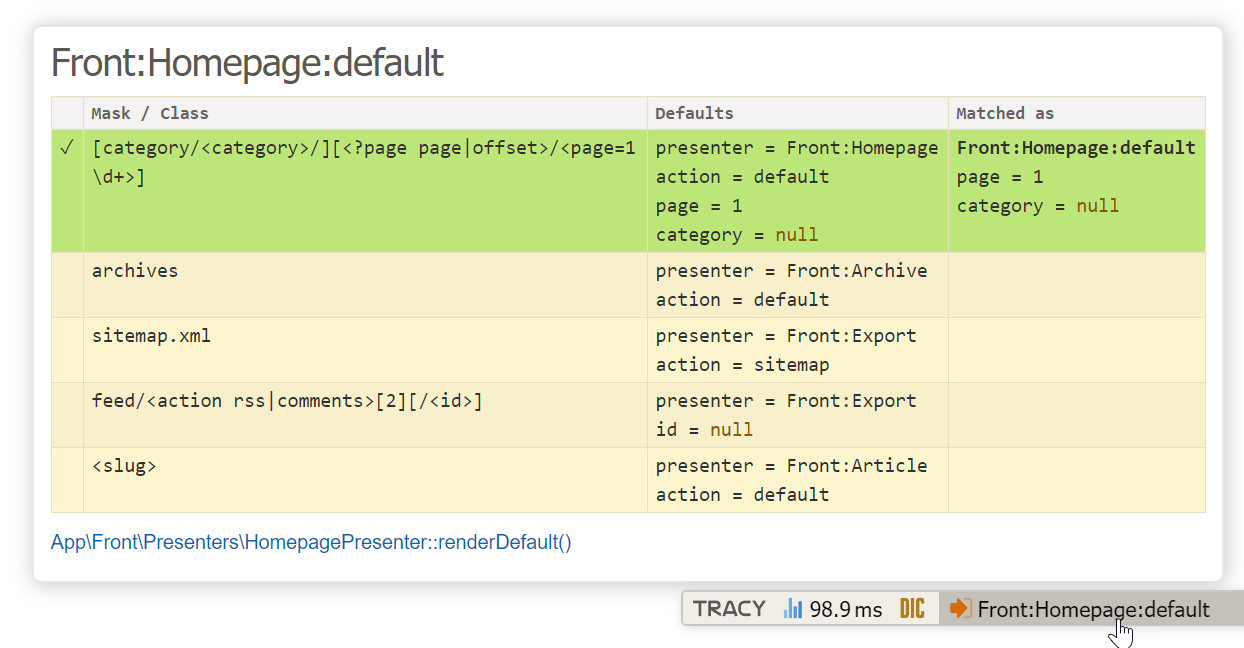
At the same time, if an unexpected redirect occurs due to canonization, it is useful to look at the panel in the redirect bar, where you can find out how the router originally understood the URL and why it redirected.
When debugging the router, we recommend opening Developer Tools in the browser (Ctrl+Shift+I or Cmd+Option+I) and disabling the cache in the Network panel so that redirects are not stored in it.
Performance
The number of routes affects the speed of the router. Their number should definitely not exceed several dozen. If your website has a too complicated URL structure, you can write a custom Custom Router.
If the router has no dependencies, for example, on a database, and its factory accepts no arguments, we can serialize its compiled form directly into the DI container and thus slightly speed up the application.
routing:
	cache: true
Custom Router
The following lines are intended for very advanced users. You can create your own router and naturally integrate it into the collection of routes. The router is an implementation of the Nette\Routing\Router interface with two methods:
use Nette\Http\IRequest as HttpRequest;
use Nette\Http\UrlScript;

class MyRouter implements Nette\Routing\Router
{
	public function match(HttpRequest $httpRequest): ?array
	{
		// ...
	}

	public function constructUrl(array $params, UrlScript $refUrl): ?string
	{
		// ...
	}
}
The match method processes the current request $httpRequest,
from which not only the URL but also headers, etc., can be obtained, into an array containing the presenter name and its
parameters. If it cannot process the request, it returns null. When processing the request, we must return at least the presenter
and action. The presenter name is complete and includes any modules:
[
	'presenter' => 'Front:Home',
	'action' => 'default',
]
The constructUrl method, on the contrary, constructs the resulting absolute URL from the array of parameters. It
can use information from the $refUrl
parameter, which is the current URL.
Add it to the route collection using add():
$router = new Nette\Application\Routers\RouteList;
$router->add($myRouter);
$router->addRoute(/* ... */);
// ...
Standalone Usage
By standalone usage, we mean utilizing the router's capabilities in an application that does not use Nette Application and presenters. Almost everything we have shown in this chapter applies to it, with these differences:
- for route collections, we use the Nette\Routing\RouteList class
- as a simple router, the Nette\Routing\SimpleRouter class
- because the
Presenter:actionpair does not exist, we use Advanced Notation
So again, we create a method that will assemble the router for us, e.g.:
namespace App\Core;

use Nette\Routing\RouteList;

class RouterFactory
{
	public static function createRouter(): RouteList
	{
		$router = new RouteList;
		$router->addRoute('rss.xml', [
			'controller' => 'RssFeedController',
		]);
		$router->addRoute('article/<id \d+>', [
			'controller' => 'ArticleController',
		]);
		// ...
		return $router;
	}
}
If you use a DI container, which we recommend, add the method to the configuration again, and then obtain the router along with the HTTP request from the container:
$router = $container->getByType(Nette\Routing\Router::class);
$httpRequest = $container->getByType(Nette\Http\IRequest::class);
Or create the objects directly:
$router = App\Core\RouterFactory::createRouter();
$httpRequest = (new Nette\Http\RequestFactory)->fromGlobals();
Now all that remains is to let the router do its work:
$params = $router->match($httpRequest);
if ($params === null) {
	// no matching route found, send a 404 error
	exit;
}

// process the obtained parameters
$controller = $params['controller'];
// ...
And conversely, use the router to construct a link:
$params = ['controller' => 'ArticleController', 'id' => 123];
$url = $router->constructUrl($params, $httpRequest->getUrl());
