Nette Command-Line
Are you writing a PHP script that runs from the command line? Whether it's a little helper for one afternoon or a tool with a whole set of commands, this library does all the tedious work around it for you:
- Reads options and arguments and checks their values
- Builds the help and clear error messages
- Handles tools with several commands too
- Prints in color, but switches colors off by itself in a pipe or a log
- Has no dependencies
Installation
composer require nette/command-line
It requires PHP version 8.2 and supports PHP up to 8.6.
First Script
It's best shown with an example. Say you have a pile of images and want to convert them to another format. Let's write a
script convert.php for it, to be called like this:
php convert.php photo.jpg logo.png --format png
php convert.php photo.jpg --dry-run
The command line is made of three kinds of items. Arguments are plain values without a dash, here the file names. An
option has a name and a value: --format png says which format to convert to, and can be shortened to
-f png. A flag is just a switch with no value: --dry-run (-n for short) makes the
script only print what it would do, without touching a single file.
How much code does it take to make all of this work? Surprisingly little. You write the conversion itself as an ordinary method, and the attributes on its parameters tell how each value is given on the command line:
use Nette\CommandLine\Attributes as Cli;
use Nette\CommandLine\Command;
use Nette\CommandLine\Parser;

final class ImageConverter
{
	#[Cli\Command('Converts images to another format')]
	public function convert(
		#[Cli\Argument('Images to convert', repeatable: true)]
		array $files,
		#[Cli\Option('Target format', alias: '-f', enum: ['jpg', 'png', 'webp'])]
		string $format = 'webp',
		#[Cli\Flag('Only show what would be done', alias: '-n')]
		bool $dryRun = false,
	): int
	{
		// converts each file to $format, with $dryRun only prints what it would do
		return 0;
	}
}
Notice that you never touch $argv or parse anything. The parameter $format becomes the option
--format, $dryRun the flag --dry-run, and the default value of a parameter applies when the
user leaves the option out. The texts in the attributes describe the items and show up in the help. repeatable: true
says there may be more files, so the method gets them as an array. enum lists the allowed values, so the script
refuses --format gif before the method is even called.
All that's left is to run the method. Below the class, in the same file convert.php, add:
require __DIR__ . '/vendor/autoload.php';

$converter = new ImageConverter;
$program = Command::from($converter->convert(...));

$parser = new Parser;
$args = $parser->parse($program);
exit($args->run());
Writing $converter->convert(...) doesn't call the method, it passes it on. Command::from() reads
from it what the script accepts. Parser then reads the command line and checks the values. Finally run()
calls your method with the right values. Whatever the method returns becomes the exit code of the script. That's how the shell,
CI or another script learns how things went: 0 means success, anything else a problem.
And since people at the command line have their habits, the script copes with all the usual spellings:
--format png, --format=png and -f png mean the same, single-letter options can be stuck
together (-nf png is -n -f png), and options may stand anywhere between the files.
Help and Errors
Every decent script should have help and report mistakes clearly. Both take just a few lines; extend the part of
convert.php that runs the method like this (the two new use lines belong at the top, with the
others):
use Nette\CommandLine\HelpRenderer;
use Nette\CommandLine\UsageException;

$converter = new ImageConverter;
$program = Command::from($converter->convert(...));
$program->addFlag('--help', 'Print this help', alias: '-h', standalone: true);

$parser = new Parser;
$renderer = new HelpRenderer;

try {
	$args = $parser->parse($program);
	if ($args->get('--help')) {
		$renderer->render($args->command);
		exit(0);
	}
	exit($args->run());

} catch (UsageException $e) {
	$renderer->renderError($e);
	exit(2);
}
The flag --help is standalone, so it works even when the user hasn't given the required files. The parser checks
nothing else in that case. HelpRenderer builds the help from the descriptions in the attributes and prints it for
$args->command, the command the user selected; in a script without commands, that's the whole program. Now try
running php convert.php --help:
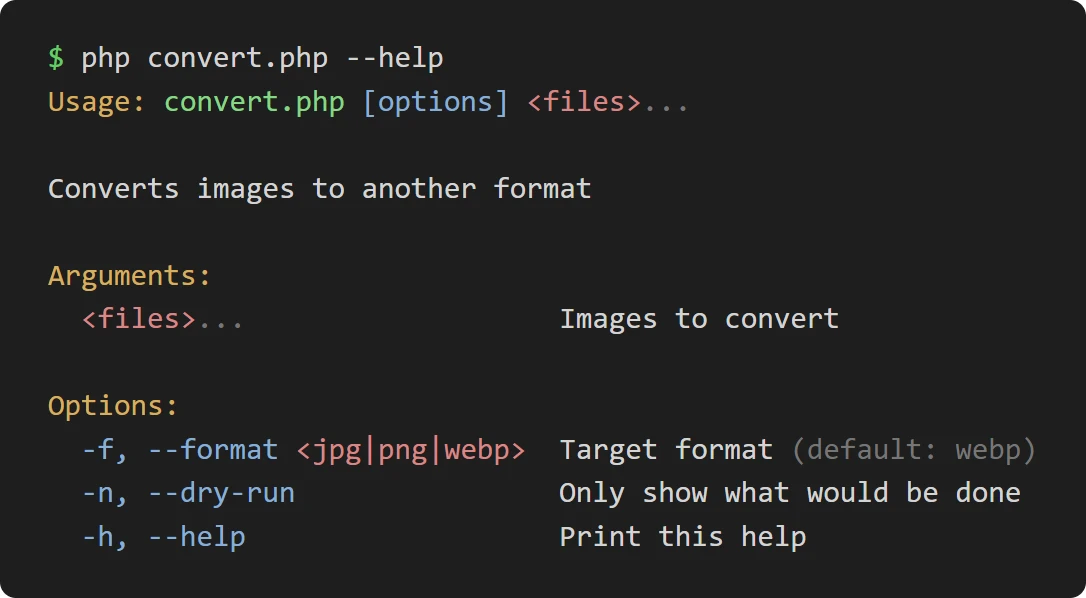
You didn't have to write it, and yet it is complete, aligned and in color. And since it comes from the same method that does the work, it will never claim anything other than what the script really can do.
Mistakes are taken care of by the catch block. When the user makes a typo or enters nonsense, the parser throws
UsageException, and instead of a stack trace renderError() turns it into a clear answer:
$ php convert.php --fromat png photo.jpg
Error: Unknown option `--fromat`. Did you mean `--format`?

$ php convert.php --format gif photo.jpg
Error: Option `--format`: expects `jpg`, `png` or `webp`, `gif` given.
The help is printed right below the message, so the user doesn't have to look anything up, and the script ends with exit code 2, the usual way to report a wrong command line. Your method isn't called at all in that case, so it never runs with nonsensical values.
This block that runs the program is the same in every script, so you write it once and from then on only change what goes into
$program.
Without Attributes
Attributes are the most comfortable way: each option is described right next to the parameter that receives it, the method gets the values straight in its parameters, and there's no separate definition to keep in sync with the code. Underneath them, though, lies a plain API you can use directly. It comes in handy for a quick script without a class, or when you put the options together at runtime:
use Nette\CommandLine\Command;
use Nette\CommandLine\Parser;

$command = new Command('convert');
$command->addOption('--format', 'Target format', alias: '-f', enum: ['jpg', 'png', 'webp']);
$command->addArgument('files', 'Images to convert', repeatable: true);

$parser = new Parser;
$args = $parser->parse($command);
$args->get('--format');  // 'png'
$args->get('files');     // ['photo.jpg', 'logo.png']
The help and errors are handled exactly as above. Everything options and arguments can do is on the page Arguments, Options and Commands.
Several Commands
Scripts have a habit of growing. Today it converts images, tomorrow it should shrink them too. Such tools are usually
controlled by commands, much like composer install and composer update:
php images.php convert photo.jpg --format png
php images.php resize photo.jpg --width 800
php images.php --quiet convert photo.jpg
You don't have to rewrite anything. Each command is one method with the #[Cli\Command] attribute, just like
convert() above, and a whole class of such methods is added in one call. Options that apply to all commands, like
--quiet on the last line, are added to the program as a whole:
$tools = new ImageTools;  // contains the methods convert() and resize()
$program = new Command('images');
$program->addFlag('--quiet', 'Print nothing but errors', alias: '-q');
$program->addFlag('--help', 'Print this help', alias: '-h', standalone: true);
$program->addCommandsFrom($tools);
The rest of the script, the parser, the help and the errors, is the same as in convert.php. Since
render($args->command) prints the help of the selected command, each command gets its own help
(php images.php convert --help). Commands can be nested too, so php images.php cache clear, for example,
is the command clear inside the command cache. More in Commands.
Terminal Output
A script doesn't only read, it also writes. That's what the Console class is for, and it follows where the
output goes. In a terminal it writes in color, and when you redirect the output to a file or the script runs in CI, it leaves the
colors out by itself, so the log stays clean. The same with progress: in a terminal it shows on a line that keeps being rewritten,
and it never gets into the log at all.
You create the console once and hand it to the class that needs it, for example in the constructor:
final class ImageConverter
{
	public function __construct(
		private Console $console,
	) {
	}

	#[Cli\Command('Converts images to another format')]
	public function convert(
		#[Cli\Argument('Images to convert', repeatable: true)]
		array $files,
	): int
	{
		foreach ($files as $file) {
			$this->console->setStatus("Converting $file");  // the progress line
			// ...
			$this->console->writeLine("$file converted", 'green');
		}
		return 0;
	}
}

$console = new Console;
$converter = new ImageConverter($console);
On top of that, text is printed exactly as it is. Some libraries look for color markup in the text, so XML or user input has to be escaped first or it breaks. Nothing like that can happen here. More on the page Terminal Output.
Testing
Finally, good news for everyone who writes tests: you test the script without running it from the command line. You pass the
parser the individual words of the command line as if the user had typed them, and check what it read from them or which mistake
it reported. The parser reports a wrong command line with ParseException, a kind of the UsageException
we caught above. The example uses Nette Tester:
$parser = new Parser;

Assert::exception(
	fn() => $parser->parse($program, ['--format', 'gif', 'photo.jpg']),
	ParseException::class,
	'Option `--format`: expects `jpg`, `png` or `webp`, `gif` given.',
);

$args = $parser->parse($program, ['photo.jpg', '--dry-run']);
Assert::same(0, $args->run());
More in Testing.
Upgrading from 1.x
Version 2.0 is a new API with no compatibility layer: in 1.x a single Parser held the definition, parsed the line
and printed the help text it had been given, while in 2.0 a Command is the definition, Parser reads a
line against it and HelpRenderer draws the help from it.
The Nette plugin for Claude Code and Codex includes a guide by which your coding agent rewrites 1.x code to 2.0 faithfully and reports every place where 2.0 behaves differently.
